

AI assistant
Use your own API key to let AI recommend tracks, tidy file names, or write album intros. Requests go directly to your chosen provider, without an intermediary.
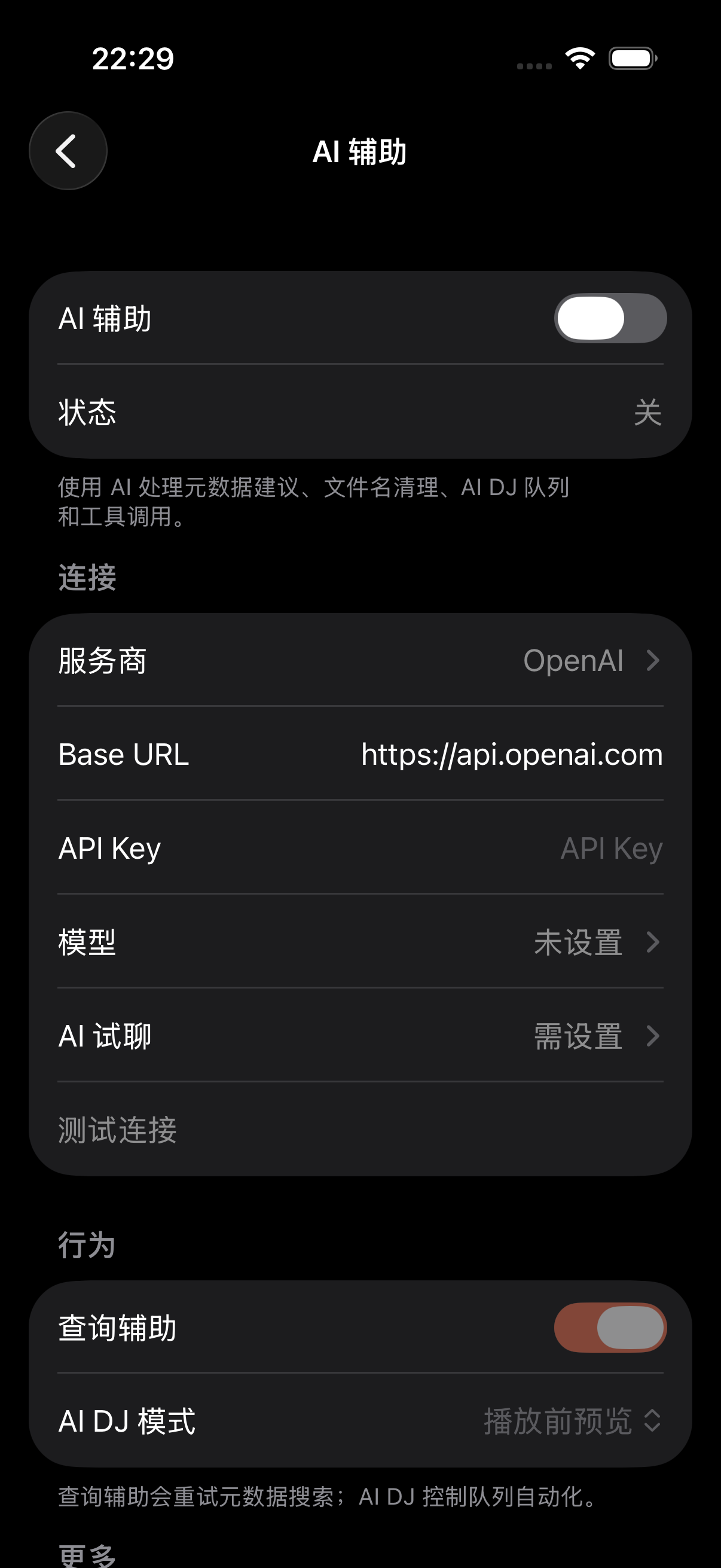
Enable AI
- 1
Turn it on
Under “Settings → Metadata & Lyrics → AI Assistance”, flip on “AI Assistance”.
- 2
Pick a provider
Under Connection choose one — OpenAI, Anthropic, Gemini, Zhipu, DeepSeek, Kimi, Qwen and others are preset, or enter a custom OpenAI-compatible endpoint or local Ollama. Then the Base URL (presets fill it in automatically).
- 3
Enter key and model
Paste your API key (secure input), then pick a fast model (for recommendations, filename cleanup) and a reasoning model (for things like album intros that need thinking). You can type a model name, or tap Available Models to pick from the list pulled from your provider.
- 4
Test it
Tap “Test Connection” to see if it works, or send a message in “AI Trial Chat” — if it replies, you're set.
Two models
TuneSync has two model roles, picked automatically by task — no manual switching:
| Fast model | Quick and cheap — AI DJ recommendations, filename cleanup, quick Q&A; replies in seconds |
| Reasoning model | Slower, higher quality — for things like album intros that need some thought; you can set how hard it thinks (minimal/low/medium/high). Also supports reasoning-model-specific adaptive thinking. |
AI DJ
The AI DJ queues songs based on what you play, skip, and favorite. Three autonomy levels:
- Preview before play — show recommendations, you choose what to play
- One-tap play — confirm and it starts
- Automatic continuation — tops up the queue itself when it's running low, hands-off
Tool calling
When Tool calling is on, the model can use these tools (read-only ones are always allowed; read-write ones need your OK):
- web_search — search the web via DuckDuckGo (album background, artist info)
- fetch_webpage — pull a specific page's content for closer reading
- search_album_art — find artwork, upscale small images to 1200x1200
- search_lyrics — find lyrics
- search_library — search songs within your library
- control_playback — control playback (play/pause/skip; needs permission)
- manage_playlist — manage playlists (add/remove; needs permission)
- Custom tools — tools you define, letting the model call your own endpoints
On privacy
AI calls use your own key and go straight to your chosen provider — TuneSync's servers don't handle them. Turn on tool calling and smart tool selection as needed: keep the capability while controlling cost. Any AI feature can be switched off in settings at any time.
Trial chat
A trial chat is available under AI Assistance — send a message without opening a specific feature to verify the connection works and the model responds. After configuring your key, it is recommended to test here first.